![BoardofCyber_Logo_Blanc.png]](https://content.boardofcyber.io/hs-fs/hubfs/Dossier%20partenaires%20FR/BoardofCyber_Logo_Blanc.png?height=50&name=BoardofCyber_Logo_Blanc.png)
To add a product to a company, you must be an account administrator.
Summary:
To add a product to your company, first go to the Companies tab on your space, represented by this pictogram :

Add a product to a company
On the "My Companies" page, which lists all the companies associated with your account, create a new company and assign it an associated service by clicking on "Add a company", or click on the cogwheel to edit the company.


Go to the "Services" tab and select "Add a service" :

Then select the product you wish to add from your list:

Add a product to an existing company
You can also add a product to an existing company by clicking on the gear under the "Companies" page :
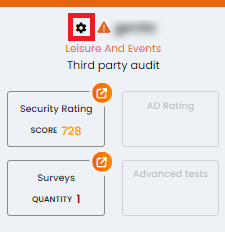
Then go to the "Services" Tab, and select "Add a Service" :

Finally, select the product that you wish to add from the list :

If you need to associate several products, please repeat the operation as many times as necessary.
1 - Add a Security Rating Product :
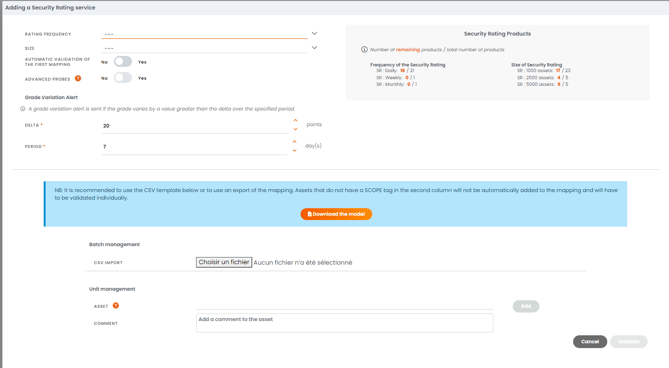
Please fill in the various fields displayed on the screen, only the licences available on your account will be selectable:
-
- Rating frequency : The rating frequency you require for the company, including daily, weekly, monthly, quarterly, semi-annually and annually.
- Size : Maximum number of assets included in the rating: 1000 assets, 2500 assets or 5000 assets.
- Automatic validation of all asset mappings or Manual Validation : Based on at least one root domain name and thanks to DNS resolutions, the asset mapping creates a map of your public assets accessible from the Internet. Choose between these 2 options : etiher to review the mapping after discovering and validating it manually or proceeding directly to automatic validation. When launching a rating, we invite you to check the mapping in order to ensure the scope of analysis.
- Advanced probes: Enables testing for the Log4J flaw. By default, this option is enabled for internal audits and disabled for third-party audits.
- Grade variation alert : Defines note variation delta and period. A notification will be generated by the system if the specified conditions are met.
- Batch management : Allows you to add a large number of assets (IPs, urls, domain names) to launch your rating. A CSV template is available to help you.
- Unit management : Allows you to add assets (IPs, urls, domain names) manually. We recommend adding your organization's root assets, "second level domain" as such "mycompany.com".
Then click on Validate. You have associated the Security Rating product with your company. If the "Automatic validation of all asset mappings" option has been activated, the rating will be available within 20 minutes.
2 - Add an AD Rating product :
- Enter the name of the AD Rating probe
- Enter the desired rating frequency
- Indicate whether your Active Directory domain is an office domain: An office domain is an Active Directory domain that manages user accounts and workstations, as opposed to a technical domain, which only manages technical resources (e.g. printers or servers).
- Grade variation alert : Defines note variation delta and period. A notification will be generated by the system if the specified conditions are met.
Then click on Validate. An Active Directory probe has been created for the company, and you must now go to the list of domains to set it up in your IS.

3 - Add a Surveys product :
- Select the number of clones (number of times the survey is reused; we recommend 2 times a year) you want for your surveys.
- Select the surveys templates you wish to add to the company.
Then click on Validate to associate one or more questionnaires with the company.

4 - Add an Advanced Tests product:
Select "Advanced tests" from the drop-down list, and click on "Validate".
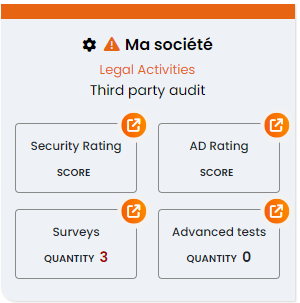
Overview of a full-service company.